FTC-Helper-Lib Simplify Java Coding for FTC
A free Java library that makes each job a robot needs one or two lines of clear code. Made for students who are new to Java.
Odometry (goBILDA Pinpoint, SparkFun OTOS, dead wheels) and driving to field points are built in, with Pedro Pathing support for smooth paths.
Version 0.15.0 · FTC SDK 12.0 (2026-27 BIOBUZZ) · Android Studio
Read the docs The simulator guide
R304: software from past seasons, and software made before Kickoff, is allowed.
The same code, two ways
Six jobs every FTC robot needs. Left: the plain FTC SDK. Right: FTC-Helper-Lib. Pick a tab.
Field-centric mecanum driving; the left trigger slows it, the further you squeeze it; a tap of BACK pauses and holding BACK for 1 s resets forward.
DcMotor fl = hardwareMap.get(DcMotor.class, "front_left");
DcMotor fr = hardwareMap.get(DcMotor.class, "front_right");
DcMotor bl = hardwareMap.get(DcMotor.class, "back_left");
DcMotor br = hardwareMap.get(DcMotor.class, "back_right");
fl.setDirection(DcMotor.Direction.REVERSE);
bl.setDirection(DcMotor.Direction.REVERSE);
for (DcMotor m : new DcMotor[] {fl, fr, bl, br})
    m.setZeroPowerBehavior(DcMotor.ZeroPowerBehavior.BRAKE);
IMU imu = hardwareMap.get(IMU.class, "imu");
imu.initialize(new IMU.Parameters(new RevHubOrientationOnRobot(
        RevHubOrientationOnRobot.LogoFacingDirection.UP,
        RevHubOrientationOnRobot.UsbFacingDirection.FORWARD)));
imu.resetYaw();

waitForStart();
while (opModeIsActive()) {
    if (gamepad1.back) imu.resetYaw();
    double y = -gamepad1.left_stick_y, x = gamepad1.left_stick_x;
    double turn = gamepad1.right_stick_x;
    double h = imu.getRobotYawPitchRollAngles().getYaw(AngleUnit.RADIANS);
    double fx = x * Math.cos(-h) - y * Math.sin(-h);
    double fy = x * Math.sin(-h) + y * Math.cos(-h);
    double speed = gamepad1.left_trigger > 0.5 ? 0.3 : 1.0;
    double d = Math.max(Math.abs(fy) + Math.abs(fx) + Math.abs(turn), 1);
    fl.setPower((fy + fx + turn) / d * speed);
    bl.setPower((fy - fx + turn) / d * speed);
    fr.setPower((fy - fx - turn) / d * speed);
    br.setPower((fy + fx - turn) / d * speed);
}
The rotation math, motor directions and power scaling, all by hand.
// Robot.java
drive(Drive.mecanum("front_left", "front_right", "back_left", "back_right")
        .imu("imu", LogoFacingDirection.UP, UsbFacingDirection.FORWARD));

// Controls.java: the whole TeleOp
@TeleOp(name = "TeleOp")
public class Controls extends ControlMap<Robot> {
    @Override protected boolean startFieldCentric() { return true; }
    @Override protected void buttons(Robot robot, Pad g1, Pad g2) { }
}
Free, with no extra code:
- Motor directions and brake, set up for you
- Wheel powers scaled so no wheel goes past full power
- Field-centric driving, and a reset of “forward”
- A slower top speed in the PRACTICE profile
- Pause everything with a tap of BACK
- The button map on GUIDE
- A clear message at INIT if a motor name is wrong, or the IMU does not start
Drive 24 inches, turn 45 degrees (the other way on the red alliance, on fields that are mirrored), then park.
// wheels[] and imu set up as in TeleOp (14 more lines)
static final double TICKS_PER_INCH = 537.7 / (96 / 25.4 * Math.PI);
static final boolean RED = false;   // change by hand before each match

public void runOpMode() {
    waitForStart();
    driveInches(24, 0.6);
    turnTo(RED ? -45 : 45, 0.5);
    driveInches(20, 0.8);           // a strafe would need its own method
}

void driveInches(double inches, double power) {
    for (DcMotor m : wheels) {
        m.setMode(DcMotor.RunMode.STOP_AND_RESET_ENCODER);
        m.setTargetPosition((int) (inches * TICKS_PER_INCH));
        m.setMode(DcMotor.RunMode.RUN_TO_POSITION);
        m.setPower(power);
    }
    while (opModeIsActive() && wheels[0].isBusy() && wheels[1].isBusy()
            && wheels[2].isBusy() && wheels[3].isBusy()) idle();
    for (DcMotor m : wheels) m.setPower(0);
}

void turnTo(double target, double power) {
    for (DcMotor m : wheels) m.setMode(DcMotor.RunMode.RUN_USING_ENCODER);
    while (opModeIsActive()) {
        double yaw = imu.getRobotYawPitchRollAngles().getYaw(AngleUnit.DEGREES);
        double err = AngleUnit.normalizeDegrees(target - yaw);
        if (Math.abs(err) < 1) break;
        double p = Math.max(-power, Math.min(power, err * 0.02));
        wheels[0].setPower(-p); wheels[2].setPower(-p);   // left side
        wheels[1].setPower(p);  wheels[3].setPower(p);    // right side
    }
    for (DcMotor m : wheels) m.setPower(0);
}
Encoder math, wait loops and a turn controller by hand. Red or blue is edited before each match.
@Autonomous(name = "Score and Park")
public class ScoreAndPark extends Auto<Robot> {
    @Override protected void steps(Steps s, Robot robot) {
        s.start("Back wall, facing the field", 0)
         .move("To the goal", 24, 0, 0.6)
         .turn("Face it", 45, 0.5)          // mirrored for RED (off for BIOBUZZ)
         .parkWithSeconds(4)
         .move("Park", 20, 90, 0.8);         // 90 = to the right (mecanum)
    }
}
Free, with no extra code:
- INIT menu: alliance and start delay
- Red/blue mirroring of every move and turn, for mirrored fields
- The 30-second timer, with time kept to park
- Smooth slow-down at the end of each move
- A move that gets stuck or takes too long stops safely
- A report of every step at the end
A flywheel at 3000 RPM that feeds three pieces, each one only when the wheel is at speed.
DcMotorEx flywheel = hardwareMap.get(DcMotorEx.class, "flywheel");
DcMotor feeder = hardwareMap.get(DcMotor.class, "feeder");
flywheel.setMode(DcMotor.RunMode.RUN_USING_ENCODER);
flywheel.setPIDFCoefficients(DcMotor.RunMode.RUN_USING_ENCODER,
        new PIDFCoefficients(10, 3, 0, 12));
final double RPM = 3000, TICKS_PER_REV = 28;
ElapsedTime steady = new ElapsedTime(), feedTimer = new ElapsedTime();
int shotsLeft = 0;
boolean feeding = false, lastRb = false;

waitForStart();
while (opModeIsActive()) {
    if (gamepad2.right_bumper && !lastRb && shotsLeft == 0) shotsLeft = 3;
    lastRb = gamepad2.right_bumper;
    flywheel.setVelocity(shotsLeft > 0 ? RPM * TICKS_PER_REV / 60 : 0);
    double rpm = flywheel.getVelocity() * 60 / TICKS_PER_REV;
    if (Math.abs(rpm - RPM) > 75) steady.reset();
    if (!feeding && shotsLeft > 0 && steady.seconds() > 0.15) {
        feeding = true;
        feedTimer.reset();
        feeder.setPower(1.0);
    }
    if (feeding && feedTimer.seconds() > 0.25) {
        feeding = false;
        feeder.setPower(0);
        shotsLeft--;
        steady.reset();
    }
}
Unit conversion, the at-speed timer and the feed timing written by hand as a small state machine.
// Robot.java
launcher = add(Launcher.flywheel("flywheel", "gobilda-5203-6000")
        .feeder(Indexer.motor("feeder")));

// Tunables.java
public static class Flywheel {
    public static double speedRpm = 3000, readyBandRpm = 75;
    public static double kP = 10, kI = 3, kD = 0, kF = 12;
}
public static class Feeder { public static double feedSec = 0.25; }

// Controls.java
g2.rb.press(() -> robot.launcher.fire(3));
Free, with no extra code:
- RPM in, RPM out: no encoder-tick math
- Feeds only when the wheel is steady at speed
- At least 0.25 s between pieces
- Gives up after 3 s if not ready, and says why
- Shots and state to show on telemetry
- Tune the RPM and gains live from the gamepad
A lift with three heights, a bottom switch and safe limits, plus an intake that toggles on one button.
DcMotorEx lift = hardwareMap.get(DcMotorEx.class, "lift");
TouchSensor bottom = hardwareMap.get(TouchSensor.class, "lift_bottom");
DcMotor intake = hardwareMap.get(DcMotor.class, "intake");
lift.setZeroPowerBehavior(DcMotor.ZeroPowerBehavior.BRAKE);
lift.setMode(DcMotor.RunMode.STOP_AND_RESET_ENCODER);
lift.setTargetPosition(0);
lift.setMode(DcMotor.RunMode.RUN_TO_POSITION);
int target = 0;
boolean intakeOn = false, lastA = false;

waitForStart();
while (opModeIsActive()) {
    if (gamepad2.x) target = 0;
    if (gamepad2.b) target = 900;
    if (gamepad2.y) target = 2400;
    target = Math.max(0, Math.min(2600, target));
    if (bottom.isPressed() && target == 0) {
        lift.setMode(DcMotor.RunMode.STOP_AND_RESET_ENCODER);
        lift.setTargetPosition(0);
        lift.setMode(DcMotor.RunMode.RUN_TO_POSITION);
    }
    lift.setTargetPosition(target);
    lift.setPower(1.0);

    if (gamepad2.a && !lastA) intakeOn = !intakeOn;
    lastA = gamepad2.a;
    intake.setPower(intakeOn ? 1.0 : 0.0);
}
Limits, switch reset and button toggle written by hand. Full power to every height, no slow stop at the ends.
// Robot.java
lift = add(Lift.slide("lift").bottomSwitch("lift_bottom"));
intake = add(Intake.motor("intake"));

// Tunables.java
public static class Lift {
    public static double min = 0, max = 2600, down = 0, low = 900, high = 2400;
}

// Controls.java
g2.x.press(() -> robot.lift.goTo("down"));
g2.b.press(() -> robot.lift.goTo("low"));
g2.y.press(() -> robot.lift.goTo("high"));
g2.a.toggle(robot.intake);
Free, with no extra code:
- Each press acts once (no held-button repeats)
- Limits always win, also for hand control
- Until the switch is pressed once, only slow downward power
- Holds the height with PID
- The intake's on/off state kept for you
- Hand control on the stick, inside the limits
One fire button with three gestures (tap, hold, double-tap), an intake switch you can feel, a two-button climb, and a buzz when the shooter is ready.
// launcher: your shooter code (Shooter tab)
// intake, lift: motors, set up as before
ElapsedTime rbDown = new ElapsedTime();
ElapsedTime lastTap = new ElapsedTime();
boolean lastRb = false, lastA = false, lastY = false;
boolean lastReady = false, intakeOn = false;
boolean holding = false, tapPending = false;

waitForStart();
while (opModeIsActive()) {
    // RB: tap = one, hold = keep firing, double = three
    boolean rb = gamepad2.right_bumper;
    if (rb && !lastRb) rbDown.reset();
    if (rb && !holding && rbDown.seconds() > 0.3) {
        holding = true;
        tapPending = false;
        launcher.startFiring();
    }
    if (!rb && lastRb) {
        if (holding) {
            holding = false;
            launcher.stopFiring();
        } else if (tapPending && lastTap.seconds() < 0.35) {
            tapPending = false;
            launcher.fire(3);
        } else {
            tapPending = true;
            lastTap.reset();
        }
    }
    if (tapPending && !rb && lastTap.seconds() >= 0.35) {
        tapPending = false;
        launcher.fire(1);
    }
    lastRb = rb;

    // A: intake on/off, 2 buzzes = on, 1 = off
    if (gamepad2.a && !lastA) {
        intakeOn = !intakeOn;
        intake.setPower(intakeOn ? 1.0 : 0.0);
        gamepad2.rumbleBlips(intakeOn ? 2 : 1);
    }
    lastA = gamepad2.a;

    // climb: hold LB, press Y
    if (gamepad2.y && !lastY && gamepad2.left_bumper) {
        lift.setTargetPosition(2400);
    }
    lastY = gamepad2.y;

    // buzz once when the shooter becomes ready
    boolean ready = launcher.isReady();
    if (ready && !lastReady) gamepad2.rumble(200);
    lastReady = ready;
}
Edge flags, two timers and a toggle written by hand, and the shooter code is still extra.
// Controls.java
// RB: tap = one, hold = keep firing, double = three
g2.rb.tap(robot.launcher::fire).says("fire one")
     .hold(robot.launcher::fireWhileHeld, robot.launcher::ceaseFire)
     .says("keep firing")
     .doubleTap(() -> robot.launcher.fire(3)).says("fire three")
     .rumble();
// A: intake on/off, 2 buzzes = on, 1 = off
g2.a.toggle(robot.intake).rumble();
// climb: hold LB, press Y
g2.lb.with(g2.y, () -> robot.lift.goTo("high")).says("climb");
// buzz once when the shooter becomes ready
g2.rumbleWhen(robot.launcher::isReady);
Free, with no extra code:
- The library tells a tap from a hold or a double-tap, and waits only when it must
- Every gesture on the button map (GUIDE)
- The times are live numbers in the tuning menu
- A hold's stop always runs, even when paused
- A button held at START does nothing
Odometry and Pedro Pathing: a straight start, then a curve to the goal with no stop, turning to 45 degrees; hold still to score, then park. Mirrored for red on mirrored fields.
// Constants.java: the drive and the Pinpoint set up again, for Pedro
static MecanumConfig drive = new MecanumConfig(c -> {
    c.frontLeftName.set("front_left");   c.backLeftName.set("back_left");
    c.frontRightName.set("front_right"); c.backRightName.set("back_right");
    c.frontLeftDirection.set(DcMotorSimple.Direction.REVERSE);
    c.backLeftDirection.set(DcMotorSimple.Direction.REVERSE);
});
static PinpointConfig pinpoint = new PinpointConfig(c -> {
    c.name.set("pinpoint"); c.xPodOffset.set(2.187); c.yPodOffset.set(-4.572);
});

// The autonomous
static final boolean RED = false;     // change by hand before each match
public void runOpMode() {
    Follower f = new Follower(new PinpointLocalizer(hardwareMap, Constants.pinpoint),
            new Mecanum(hardwareMap, Constants.drive), new Foresight(Constants.foresight));
    double m = RED ? -1 : 1;          // mirror every x and heading by hand
    f.setPose(new Pose(72 + m * -56, 11, Math.toRadians(90)));
    Path toGoal = path(
        line(new Pose(72 + m * -56, 11), new Pose(72 + m * -48, 22)).constant(Math.toRadians(90)),
        curve(new Pose(72 + m * -48, 22), new Pose(72 + m * -44, 36), new Pose(72 + m * -30, 42))
            .linear(Math.toRadians(90), Math.toRadians(90 + m * 45)));
    f.holdEnd.set(true);
    waitForStart();
    f.follow(toGoal);
    ElapsedTime t = new ElapsedTime();
    while (opModeIsActive() && f.following() && t.seconds() < 10) {
        f.update();
        intake.update();              // and every other mechanism, by hand
    }
    while (opModeIsActive() && t.seconds() < 10.5) f.update();   // hold to score
    // ...then the park path, the same way
}
Pedro is good at paths. But the drive and odometry are set up twice, the mirroring and the update loop are by hand, and nothing reports what went wrong.
// Robot.java: two lines, after drive(...)
odometry(Odometry.pinpoint("pinpoint").offsetsMm(-84, -168));
follower(Pedro.follower(PedroConstants.foresight));

// The autonomous: field inches, seen from your wall
s.start("Our wall, left corner tile", -56, -61, 0)
 .follow("To the goal", PedroPath.line(-56, -61, -48, -50).keepHeading(0)
         .then(PedroPath.curve(-48, -50, -44, -36, -30, -30)).turnTo(0, 45)
         .holdEnd())
 .waitSeconds("Score", 0.5)
 .parkWithSeconds(4)
 .driveTo("Park", -56, -36, 0, 0.7);
Free, with no extra code:
- One odometry for
driveTo, Pedro, TeleOp and the simulator - Red/blue mirroring, and the pose starts at the start spot
- Every mechanism keeps working while Pedro drives
- A path that is stuck, too slow or loses the odometry stops safely and says why
- INIT stops on a setup mistake, not in the match
- Pedro's own tuner runs on the same robot lines
Try your robot without a robot: the simulator
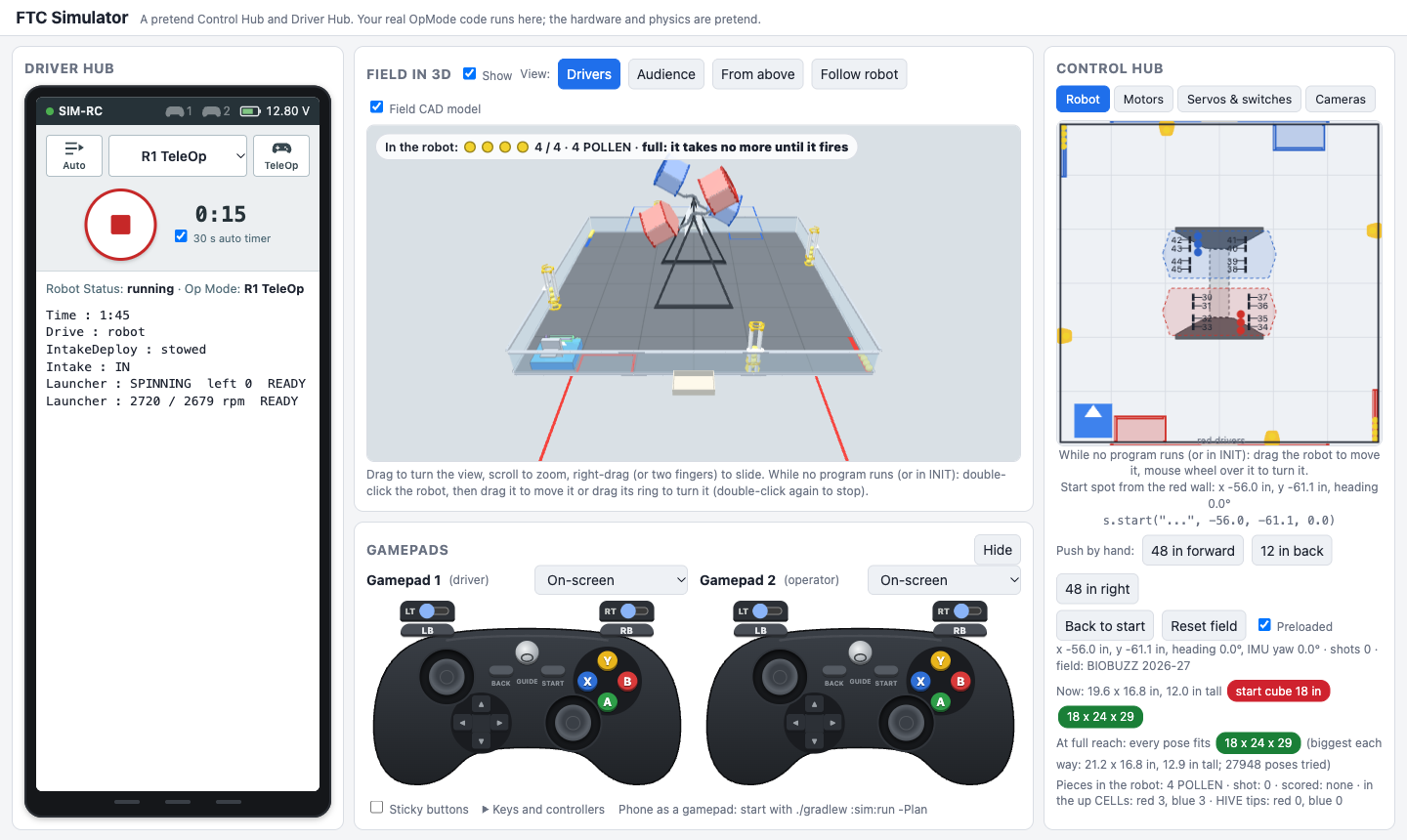
Your real OpModes run on a laptop against a pretend Control Hub and Driver Hub, in a browser. No robot, no field, no phone.
- This season's field in 3D, from the official field CAD, with physics: the robot bumps into field parts and pushes game pieces; intakes take them in and launchers shoot them.
- Your robot's real size and parts, from your
Robot.javaor your CAD. It checks the 18 in start cube and the 18 × 24 × 29 in limits in every pose. - Drive it with the keyboard, a real gamepad (USB or Bluetooth) or a phone.
- See inside: motors, servos, switches, cameras (with the AprilTags they see) and the telemetry on the Driver Hub.
- Odometry and Pedro paths run too: a pretend Pinpoint or OTOS, and you can make it measure wrong to see what bad tuning does.
- Scripted tests that press buttons and check results, to catch mistakes before a meeting.
- Four BIOBUZZ starter bots to try, from the goBILDA, REV, AndyMark and Studica kits.
- Add the library to your robot project (about 10 minutes).
- In its folder, run
./gradlew :sim:fromRobotonce (it builds the simulator's robot from yourRobot.java), then./gradlew :sim:run. - Open
http://localhost:8780in a browser, choose an OpMode, press INIT, then START. To drive with the keyboard, set gamepad 1's list to "Keyboard" (or click the on-screen gamepad).
The simulator guide The four starter bots
Features
- Motors and servos in one line. Clear errors when a name in the configuration is wrong.
- Buttons made easy. Tap, hold, double-tap, tap then hold, pairs and buzzes, several on one button.
- Mecanum and tank drive. Robot-centric or field-centric, slow mode, and autonomous moves and turns.
- Lifts and arms that cannot hurt themselves. Named positions, soft limits, limit switches and homing.
- Intakes in one line. A motor, servo wheels, or both. In, out and on/off on any button, and push out while a button is held. With the motor's encoder cable plugged in, a jam is backed out by itself.
- A full shooter kit. Flywheel in RPM, hood, turret with safe limits, and a feeder that waits until the shot is ready.
- AprilTag aiming. A webcam or a Limelight 3A, through one interface.
- Autonomous as a list of steps. Before the match, pick your alliance and a start delay on the Driver Station. Write the moves once: on fields where the two sides are mirror images, they flip by themselves for the other alliance. A 30-second timer keeps time to park, and a report at the end says how each step went.
- Odometry: know where the robot is. goBILDA Pinpoint, SparkFun OTOS or dead wheels, with a tuner that measures the offsets. Drive to field points, and TeleOp starts where autonomous ended.
- Smooth paths with Pedro Pathing support. Lines and curves on the field, one after another with no stop. Write a path once, and it works from either alliance's side. Pedro's tuner uses your robot's own setup, so nothing is set up twice.
- The whole robot in a few short files. What is on it, its numbers, its buttons and its autonomous modes, each in its own file.
- Live tuning. Change numbers from the gamepad while the robot runs; saved on the hub.
- Finders. Ready-made OpModes that measure servo ends, lift limits, flywheel gains and more, and show the code to copy.
- Hardware check. A ready-made OpMode that tests every motor, servo and sensor.
- The simulator. Your real OpModes on a laptop, with the field in 3D.
All 20 modules · Search every class and method
Start here
Part Designs real robot parts in CAD
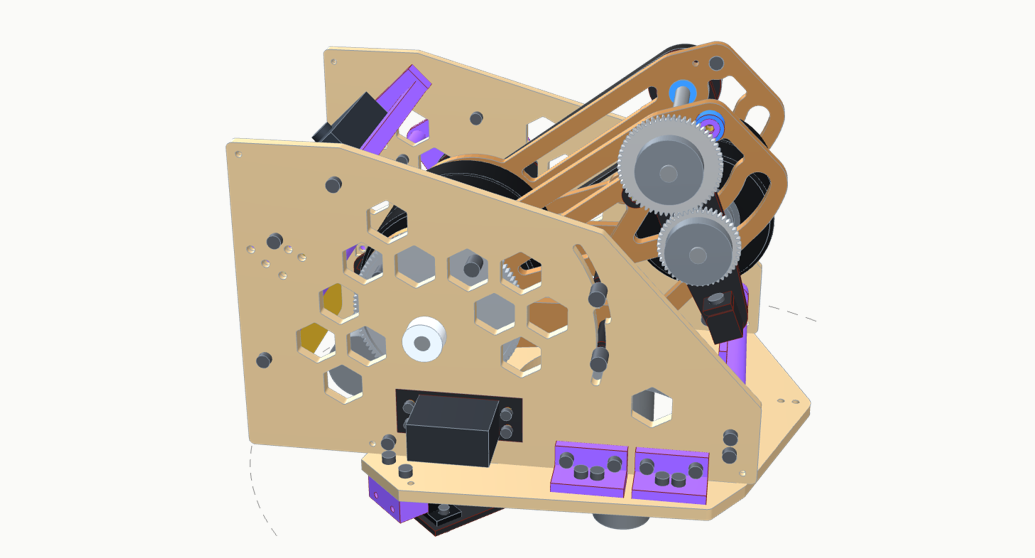
The CAD of real FTC robot parts, made in build123d (Python), with a 3D model you can turn in the browser, the design decisions and the checks behind them, and a parts list with real part numbers.
- Swivel turret shooter v8.1GB and v8.1, current
Two flywheels and an adjustable hood. Two options: v8.1GB on the goBILDA Gear-Driven Turret bearing, or v8.1 with no bearing to buy (plywood base, printed ring gear). 3D model, design decisions, engineering math, parts list, CAD downloads and a shot simulator. Every older version (v1 to v8) is there too. - More parts coming later
A lifter and an intake are in progress.