Odometry module
Package: com.crossbotics.ftchelper.odometry (the Robot.java line, Odometry,
is in com.crossbotics.ftchelper.robot).
Learn it hands-on: Lesson 7: Odometry. Worked example:
examples/.../odometrybot.
Quick answers with code to copy: cookbook: odometry and driveTo.
Odometry tells the robot where it is on the field. Small unpowered wheels, called pods, roll on the tiles and count how far the robot moved forward and sideways. Or an optical sensor under the robot watches the floor go by, like a computer mouse. Add up every small move and you know where the robot is, and which way it faces. That is its pose: x, y and heading.
Why not just count the drive wheels? Drive wheels slip: they spin when the robot is pushed, and they skid when it speeds up. Pods carry no load and do not slip, so they measure what really happened.
Why not AprilTags? In BIOBUZZ the tags are on the HIVE cells, and the cells move. A tag tells you where you are compared with the tag, not with the field. So this season, odometry (not tags) tells you where you are (vision).
| Class | Use it to |
|---|---|
Odometry |
the one line in Robot.java: which device, and where it sits |
PoseTracker |
read the pose every loop, set it, check the device (every kind is one) |
PinpointOdometry |
a goBILDA Pinpoint odometry computer with two pods |
OtosOdometry |
a SparkFun OTOS optical sensor |
DeadWheelOdometry |
three dead-wheel pods, or two and the IMU, on motor encoder ports |
OdometryTunerOpMode |
checks and measures the odometry and shows the lines to copy |
flowchart LR
    D["Pinpoint, OTOS<br/>or dead wheels"] --> T["PoseTracker<br/>(updated first, every loop)"]
    T --> P["robot.pose()<br/>x, y, heading"]
    P --> A["autonomous: driveTo(...)"]
    P --> E["end of autonomous:<br/>the pose goes to TeleOp"]
    P --> F["TeleOp: field-centric<br/>forward"]
The frame
Section titled “The frame”The frame is the set of directions the numbers use. It is the same as the autonomous start spot
(s.start(note, x, y, heading), see Auto). Stand at your drivers’ wall and look at
the field:
far wall +-----------------------------------+ | y + | | ^ | | | | | x - <--------+--------> x + | (0, 0) = the middle of the field | | | | v | | y - | +-----------------------------------+ your drivers' wall (you)- x: inches to the RIGHT of the field’s centre line.
- y: inches AWAY from you (negative = your half).
- heading: degrees. 0 = facing away from you. Counterclockwise is +: 90 = facing left, -90 = facing right, 180 = facing you.
- The pose is the pose of the robot’s centre: the point it turns around (on a mecanum robot, the middle of the four wheels).
The BIOBUZZ field in this frame, with lesson 7’s start, goal and park points (drawn from the RED wall;
from the BLUE wall the numbers are the same, because the field is turned half a turn between the
alliances and mirrorForRed() is false):
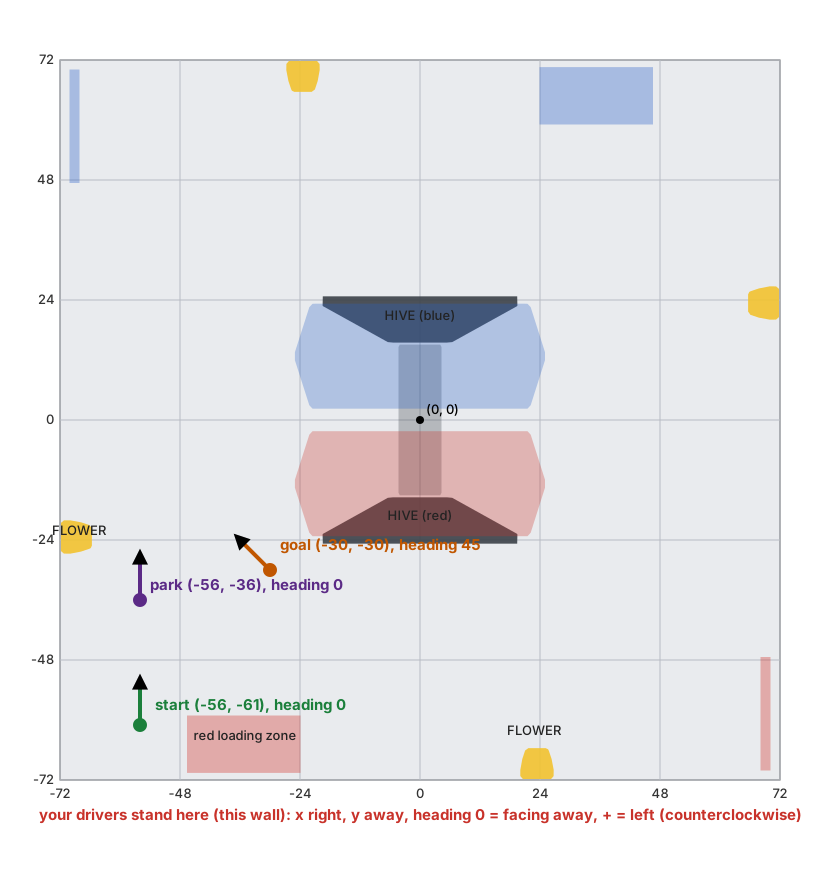
The map is made by tools/field_map.py from the simulator’s field file (sim/fields/biobuzz-2026.json).
Where is (0, 0)? Wherever the pose was last set. An Auto sets it from its start spot after START,
so with s.start(note, x, y, heading) it is the middle of the field. With s.start(note, heading)
(no spot) the robot starts at (0, 0), so x and y are measured from where it started.
Why this frame? It is the one the drivers see. “Go to x -30, y -30” means the same spot in every autonomous, from every start.
Robot.java: the odometry line
Section titled “Robot.java: the odometry line”One line in define(), next to the drive:
odometry(Odometry.pinpoint("pinpoint").offsetsMm(-84, -168)); // goBILDA Pinpoint, 4-bar podsodometry(Odometry.otos("otos").mountIn(0, -3, 0)); // SparkFun OTOSodometry(Odometry.threeWheels("par_left", "par_right", "perp") .trackWidthIn(13.2).perpForwardIn(-6)); // three dead wheelsodometry(Odometry.twoWheels("par", "perp").parallelLeftIn(5).perpForwardIn(-6)); // two + the IMUIt needs import com.crossbotics.ftchelper.robot.Odometry; at the top of Robot.java. The names
are the names in the robot configuration on the Driver Station. Use only one odometry(...) line.
With it you get:
robot.pose(): where the robot is, every loop (below).s.driveTo(...)in autonomous: drive to a field point (below).- TeleOp starts where autonomous ended, and field-centric “forward” comes from the odometry (below).
- The simulator gets pretend odometry (
:sim:fromRobotwrites its lines, below).
The offsets say where the pods (or the sensor) sit, measured from the robot’s centre. Why they matter: when the robot turns in place, a pod that is not at the centre rolls too. The library takes that roll away, but only if it knows how far from the centre the pod is. The Odometry Tuner measures them for you.
Pinpoint
Section titled “Pinpoint”odometry(Odometry.pinpoint("pinpoint").offsetsMm(-84, -168));A goBILDA Pinpoint is a small computer on an I2C port. Two pods plug into it: the X pod measures forward and back, the Y pod measures sideways. It also has its own IMU (turn sensor). It works out the pose itself, about 1500 times a second, and the library reads the answer once per loop.
| Setting | Means | Default |
|---|---|---|
pinpoint(name) |
the Pinpoint’s configuration name | |
offsetsMm(xPodLeftMm, yPodForwardMm) |
where the pods sit, mm (see the sketch) | 0, 0 |
podsSwingarm() |
goBILDA swingarm pods instead of 4-bar pods | 4-bar pods |
ticksPerMm(counts) |
other pods: encoder counts per mm of wheel travel | |
reversed("x"), reversed("y"), reversed("x", "y") |
a pod that counts the wrong way (the tuner says which). Names add up over several calls; "X" and "x" both work; a name that is not a pod stops INIT (a Pinpoint's pods are "x" and "y") |
none |
The two offsets (goBILDA’s own meaning, from the SDK):
- First number: how far LEFT of the centre the X pod (the forward-measuring one) is. Right of the centre = negative.
- Second number: how far FORWARD of the centre the Y pod (the sideways-measuring one) is. Behind the centre = negative.
Seen from above, the lesson robot’s offsetsMm(-84, -168):
FRONT +-----------------------+ | | | ^ | | C | C = the robot's centre | |<-84 mm->[X] X pod (rolls forward/back): 84 mm RIGHT of C -> -84 | 168 mm | | | | | [Y] | Y pod (rolls sideways): 168 mm BEHIND C -> -168 +-----------------------+ BACKOnly the X pod’s left/right distance matters, and only the Y pod’s forward/back distance. (A pod
right at the centre line gives 0.) Swingarm pods: add .podsSwingarm(). Any other pod: .ticksPerMm(...).
odometry(Odometry.otos("otos").mountIn(0, -3, 0));A SparkFun OTOS (Optical Tracking Odometry Sensor) is a small sensor on an I2C port that looks at the floor, like a computer mouse, and has its own IMU. No pods. It must sit 10 to 12 mm above the tiles.
| Setting | Means | Default |
|---|---|---|
otos(name) |
the OTOS’s configuration name | |
mountIn(forwardIn, leftIn, headingDeg) |
where it sits: inches FORWARD of the centre (back = negative), inches LEFT (right = negative), and which way the sensor’s Y arrow points, degrees counterclockwise from the robot’s front | 0, 0, 0 |
The heading in mountIn: the OTOS’s own axes are x = right and y = forward (as in the SDK’s
sample), so its Y arrow is its forward axis. Heading 0 = the Y arrow points to the robot’s front.
A sensor turned so its X arrow points forward has its Y arrow pointing left: that is 90
(counterclockwise). Its Y arrow pointing right is -90. (From OtosOdometry: the offset goes to the
OTOS as (-leftIn, forwardIn, headingDeg). Not yet checked on a robot: if a push forward shows up
as sideways in the Pose line, try the other sign.)
Measure mountIn with a tape: the tuner does not measure it for an OTOS. Its two scale numbers are in
Tunables.Odometry.
Three dead wheels
Section titled “Three dead wheels”odometry(Odometry.threeWheels("par_left", "par_right", "perp").trackWidthIn(13.2).perpForwardIn(-6));Dead wheels are pods with no computer: each pod’s encoder plugs into a motor port’s encoder connector. Two pods measure forward (one left of the centre, one right) and one measures sideways. The library works out the pose from their counts every loop. The names are the motor ports’ configuration names, in this order: left forward pod, right forward pod, sideways pod.
| Setting | Means | Default |
|---|---|---|
trackWidthIn(inches) |
the distance between the left and right forward pods (required) | |
perpForwardIn(inches) |
how far FORWARD of the centre the sideways pod is (back = negative) | 0 |
podsSwingarm(), ticksPerMm(counts) |
the pods’ encoder counts per mm | goBILDA 4-bar pods |
reversed(names...) |
the pods that count the wrong way, by port name | none |
Put the two forward pods the same distance either side of the centre: the library takes their average as the forward move.
FRONT +-----------------------+ | | | [L] C [R] | L and R roll forward/back; trackWidthIn = L to R | | | [P] | P rolls sideways: perpForwardIn = -(C to P), behind = negative +-----------------------+A pod’s port can still drive a motor: the pod’s encoder cable takes the place of that motor’s encoder, and the library only reads the count. (So a motor on that port loses its own encoder.)
Two dead wheels and the IMU
Section titled “Two dead wheels and the IMU”odometry(Odometry.twoWheels("par", "perp").parallelLeftIn(5).perpForwardIn(-6));One forward pod, one sideways pod, and the Control Hub’s IMU for the heading. It needs the IMU in the
drive line (drive(...).imu(...)); the odometry sets the IMU up and zeroes it at INIT.
| Setting | Means | Default |
|---|---|---|
parallelLeftIn(inches) |
how far LEFT of the centre the forward pod is (right = negative) | 0 |
perpForwardIn(inches) |
how far FORWARD of the centre the sideways pod is (back = negative) | 0 |
podsSwingarm(), ticksPerMm(counts), reversed(names...) |
as for three wheels |
Which kind? A Pinpoint is the easiest: the pose is worked out on the device, 1500 times a second, with one I2C read per loop. Three dead wheels need no extra computer but use three encoder ports. Two wheels save a port but trust the IMU for turning. An OTOS has no wheels to mount, but its height above the tiles matters and it needs its scale numbers measured.
Your own pose source: Odometry.custom
Section titled “Your own pose source: Odometry.custom”odometry(Odometry.custom(devices -> new MyPoseTracker(devices.get(MyDevice.class, "my_device"))));For a pose from somewhere else (odometry fused with AprilTags, another library’s localizer): your class
extends PoseTracker (read(), write(), isReady(), status(), kind()), and the library makes it at INIT from the robot’s devices.
robot.pose(), driveTo and the hand-off to TeleOp use it like the built-in kinds. It must use the
library’s frame (above); PoseTracker’s read() and write() work in the device
frame (X forward, Y left) and are turned for you. The simulator has no pretend device for it
(:sim:fromRobot writes only a comment), and the Odometry Tuner does not measure it.
Mistakes stop INIT with a message: a setting for another kind (mountIn on a Pinpoint), three wheels
with no trackWidthIn, two wheels with no IMU, a device name used twice, an empty name, a
reversed(...) name that is not a pod (the pods are [par_left, par_right, perp]), a custom(...)
that makes nothing (null).
Tunables.Odometry
Section titled “Tunables.Odometry”public static class Odometry { public static boolean checked = false; public static double linearScalar = 1.0, angularScalar = 1.0; // OTOS only}| Field | Means | Default |
|---|---|---|
checked |
set it true by hand after the Odometry Tuner’s Loop test passes. Until then, driveTo steps are skipped on a real robot |
false |
linearScalar |
OTOS only: distance scale (the tuner’s Forward test measures it; allowed 0.872 to 1.127) | 1.0 |
angularScalar |
OTOS only: turning scale (measure it by hand; 0.872 to 1.127) | 1.0 |
They are read once, at INIT, and are not in the tuning menu: change them in Tunables.java and rebuild.
Why a switch you set by hand? Like Tunables.Drive.calibrated: a pod counting the wrong way
makes driveTo drive the wrong way, at speed. Until a person has seen the Loop test pass, the
library will not drive to points. The simulator is the exception: there driveTo runs anyway.
robot.pose()
Section titled “robot.pose()”FieldPose p = robot.pose(); // x, y in inches; headingDegrobot.pose() is where the robot is now, in the frame: p.x, p.y and p.headingDeg.
It is a copy (FieldPose): changing it does not move the robot. It is null
when Robot.java has no odometry(...) line.
On the Driver Station every loop, the odometry adds a line by itself, labelled Pose:
x -30.0, y -30.0 in, heading 45.0, and a warning on top if the device is not ready. In
Controls.java you can show it your own way:
show("Where", robot::pose); // "(-30.0 in, -30.0 in, 45.0 deg)"robot.odometry() is the running PoseTracker (null before INIT or with no
odometry line); robot.odometrySpec() is the line as written; robot.odometryChecked() reads
Tunables.Odometry.checked.
PoseTracker
Section titled “PoseTracker”Every kind of odometry is a PoseTracker, so your code reads them all the same way.
| Method | What it does |
|---|---|
update() |
reads the device once and works out the new pose. The robot calls it for you, once per loop, first |
pose() |
this loop’s pose (a copy) |
setPose(FieldPose) |
says “the robot is here now” (autonomous does this from its start spot; TeleOp from where autonomous ended). Set while the device is not ready yet (a Pinpoint still calibrating in TeleOp’s INIT), the pose is kept and written to the device as soon as it is ready |
speedInPerSec(), turnDegPerSec() |
how fast it moves and turns, if the device says (Pinpoint, OTOS). Always 0 for dead wheels: do not use them for “has it stopped?” there (compare two poses a few loops apart instead) |
isReady() |
true when the device works and gives a pose |
status() |
words for the Driver Station (table below) |
kind() |
“Pinpoint”, “OTOS”, “three dead wheels” or “two dead wheels + IMU” |
name(), addTelemetry(t) |
the Subsystem parts: the Pose line, and a warning when not ready |
status() and the warning:
| Kind | Status | Means |
|---|---|---|
| Pinpoint | ready |
working |
| Pinpoint | calibrating (keep the robot still) |
its IMU is starting: do not move the robot |
| Pinpoint | starting up |
just powered on |
| Pinpoint | X pod not found: check its cable, Y pod not found: check its cable, no pods found: check both cables |
a pod is unplugged |
| Pinpoint | IMU fault: power the robot off and on |
its IMU stopped working |
| Pinpoint | bad reading (I2C cable?) |
a garbled answer: check the I2C cable |
| Pinpoint | no answer |
no status at all |
| OTOS | ready / not answering: check the I2C cable and the configuration |
checked at INIT, then again once a second |
| Dead wheels | ready |
always (an encoder cannot say it is unplugged: the Odometry Tuner’s counts show it) |
A device that is not ready does not stop the program: the warning tells the drive team. An
autonomous also reads the odometry in INIT and shows Odometry: Pinpoint ready, or a warning such as
Odometry (Pinpoint): X pod not found: check its cable, so a missing pod is seen before START.
How the frames fit (for veterans). Inside, PoseTracker works in one shared device frame: X
forward and Y left at heading 0 (the goBILDA Pinpoint’s frame, and the dead-wheel math’s). The library’s
frame is turned a quarter turn from it: our x (right) = -Y, our y (away) = X, the heading is the same.
PoseTracker turns one into the other in update() and setPose(). The SparkFun OTOS’s own axes are
different again: x = right, y = forward (as in the SDK’s sample). OtosOdometry converts its position,
speed and mounting offset to the shared frame, so mountIn(forward, left, heading) stays forward and
left. Your code only sees the drivers’ frame.
PinpointOdometry
Section titled “PinpointOdometry”The robot layer makes it for you. Without the five files:
GoBildaPinpointDriver pp = hardwareMap.get(GoBildaPinpointDriver.class, "pinpoint");PoseTracker odo = new PinpointOdometry("pinpoint", pp, -84, -168, GoBildaPinpointDriver.GoBildaOdometryPods.goBILDA_4_BAR_POD, 0, false, false);// every loop:odo.update();FieldPose p = odo.pose();The arguments: name, device, X pod mm left, Y pod mm forward, pod type (or null to use the next
number), counts per mm (only when the pod type is null), X reversed, Y reversed. Making it zeroes
the Pinpoint and its IMU (resetPosAndIMU()): the robot must be still for about a quarter second (INIT is).
device() gives the SDK’s GoBildaPinpointDriver for anything else.
OtosOdometry
Section titled “OtosOdometry”SparkFunOTOS sensor = hardwareMap.get(SparkFunOTOS.class, "otos");PoseTracker odo = new OtosOdometry("otos", sensor, 0, -3, 0, 1.0, 1.0);The arguments: name, device, inches forward, inches left, its heading, linear scale, angular scale.
Making it sets inches and degrees, the mounting offset and the scales, calibrates its IMU and zeroes it
(the robot must be still). device() gives the SDK’s SparkFunOTOS.
DeadWheelOdometry
Section titled “DeadWheelOdometry”PoseTracker odo = DeadWheelOdometry.threeWheels("odometry", left, right, perp, 505.3, 13.2, -6, false, false, false); // counts per inch, track width, perp forward, reversed x3PoseTracker odo2 = DeadWheelOdometry.twoWheels("odometry", par, perp, () -> imuHeadingDeg(), 505.3, 5, -6, false, false); // + the heading, counter-clockwise +The pods are DcMotorEx ports (only getCurrentPosition() is read). 505.3 counts per inch is a
goBILDA 4-bar pod (19.894 counts per mm). The math each loop: with three wheels the turn is
(right - left) / track width and the forward move is their average; with two, the turn comes from the
IMU and the forward pod’s roll during the turn is taken away. The sideways pod’s roll during the turn
is taken away too. Then the move is turned into the field frame using the heading halfway through the
turn.
Escape hatches (for veterans)
Section titled “Escape hatches (for veterans)”When the five files do not cover what you need:
| Use | What you get |
|---|---|
robot.odometry() |
the running PoseTracker (null before INIT, or with no odometry line) |
((PinpointOdometry) robot.odometry()).device() |
the SDK’s GoBildaPinpointDriver (raw encoder counts, its own status, its loop rate) |
((OtosOdometry) robot.odometry()).device() |
the SDK’s SparkFunOTOS |
Odometry.custom(devices -> ...) |
your own pose source in place of the built-in kinds (above) |
AutoRoutine.driveTo(label, poseSupplier, readySupplier, x, y, heading, maxPower, toleranceIn) |
driveTo on any pose you supply, outside the five files; it stops with NO_ODOMETRY when readySupplier stays false for 0.2 s (leave it out, and the pose is always trusted) |
What runs every loop
Section titled “What runs every loop”- The odometry updates first, before every other part and before the actions
(
RobotDefinition.setupadds it first). So every part, every action and everydriveToreads this loop’s pose. - Pinpoint: one I2C read per loop (
update()on the driver reads position, speed and status in one go). The Pinpoint does its own math 1500 times a second, so the loop’s speed does not change its accuracy. - OTOS: two I2C reads per loop (position, then speed).
- Dead wheels: one encoder read per pod (part of the hub’s bulk read), and the library’s math.
- Two dead wheels: plus one IMU read per loop (the IMU is not part of a bulk read).
- In INIT nothing is updated (as for every part). While paused (BACK) it is not read either; a Pinpoint or OTOS keeps counting on its own, and dead wheels catch up on the next loop.
More: What runs every loop.
driveTo
Section titled “driveTo”s.start("Against our wall, in the left corner tile, facing the field", -56, -61, 0) .driveTo("To the goal", -30, -30, 45, 0.6) // x, y, heading, max power .driveTo("Park", -56, -36, 0, 0.7, 2.0); // last number: "close enough", inches (default 1)driveTo(label, xIn, yIn, headingDeg, maxPower) drives to a point on the field and turns to a
heading at the same time. It is a Steps step (and an AutoRoutine and AutoDrive
method underneath). Mecanum only: it drives sideways. (On a tank drive, INIT stops with
Steps: driveTo("...") needs a mecanum drive (it drives sideways)..., so you find out before the
match, not in the middle of it: use turnTo and then move.)
How it drives, every loop:
- Read the pose. Work out how far the point is, and turn that into “forward” and “right” for the robot.
- Far away: speed like a
move: up tomaxPower, slowing down as it gets close. - In the last 8 inches: speed in proportion to the distance left (0.04 power per inch, at least 0.12), so it settles on the point instead of circling it.
- The heading is corrected all the way with the drive’s turn numbers (
turnKp,turnKdinTunables.Drive). While the heading is off, the turn power is at leastAutoDriveConfig.turnMinPowerif that is set (more than 0), else 0.08, so a weak turn cannot stop just short. (Tunables.Drivehas noturnMinPoweryet, so a five-file robot uses 0.08.) - Done when it is within the tolerance (“close enough”: 1 inch unless you give one) and
within 2 degrees of the heading (or the drive’s
turnToleranceDeg, if that is bigger), for 3 loops in a row (so passing by does not count).
If the odometry stops working during a driveTo (a Pinpoint fault such as a pod unplugged, or an
OTOS that stops answering: isReady() false): a short glitch is fine, the robot holds still and waits
up to 0.2 s. If it is still not ready, the step ends and the report word is NO_ODOMETRY. Why:
driving on a frozen pose, it would never arrive and would push on until the time ran out. The OTOS’s
connection is checked again once a second.
It also ends early: STALLED if it is stuck (farther than 8 inches from the point, the same rule as a
move: less than 0.25 in closer in 0.4 s; in the last 8 inches, where it is slow on purpose, less than
0.1 in closer in 2 s), TIMED_OUT after 10 s, STOPPED on STOP or park time. The report shows the word.
After any of these, the autonomous goes on with its next steps, from wherever the robot is. So put
a mechanism action that needs the right place right after the driveTo that gets it there, and check
the report after practice runs: a driveTo that did not say done means the next steps started from
the wrong place. (In your own step(...) you can check robot.pose() before an action.)
Why driveTo and not move? A move counts the drive wheels: a bump, a slip or a push and every
later step is off. driveTo checks the real pose every loop and keeps correcting, so it ends at the
field point, wherever the bump left it. And each point is a place on the field, so changing one step
does not shift the steps after it.
Its rules:
- It needs an
odometry(...)line inRobot.java. Without one, INIT stops:Steps: driveTo("To the goal") needs odometry: add an odometry(...) line to Robot.java (docs/modules/odometry.md). - On a real robot it needs
Tunables.Odometry.checked = true. Until then the step does nothing, and the report saysTo the goal: skipped: Tunables.Odometry.checked is false (run the Odometry Tuner first). In the simulator it runs anyway. - Like every step, it needs a tuned drive (
Tunables.Drive.calibrated = true). - RED: written for BLUE, like the start spot. With
mirrorForRed()true (the default), RED uses x and the heading flipped (x -30 becomes x 30, heading 45 becomes -45); y stays. WithmirrorForRed()false (BIOBUZZ: the field is turned half a turn), RED uses the same numbers, seen from the red wall. - Use the start spot (
s.start(note, x, y, heading)) with it: the pose starts there. Without a spot the pose starts at (0, 0) where the robot stands, and the points are measured from there.
turnTo and driveTo use different headings. turn and turnTo use the Control Hub’s IMU, with
0 = the way the robot faced at the start. driveTo uses the field heading from the odometry, with
0 = facing away from your wall. They agree only when the start heading is 0. With
s.start(note, x, y, 90), turnTo(..., 0, ...) turns back to the start direction, which is field
heading 90, while driveTo(..., 0, ...) faces away from your wall. With odometry, give headings in
driveTo (field numbers, like the points); if you also use turnTo, remember its 0 is the start.
Every step: the autonomous builder.
TeleOp starts where autonomous ended
Section titled “TeleOp starts where autonomous ended”- Autonomous START: the first step (“Start”) sets the pose from the start spot (mirrored for RED like the routes).
- Autonomous end (done, STOP or an error, after START): the whole pose (
robot.pose()) goes toMatchMemory/PoseStore. - TeleOp INIT (
Controls.java): if autonomous left a pose in the last 5 minutes, the odometry starts there. Otherwise it starts at (0, 0, 0) where the robot stands. - Field-centric “forward” comes from the odometry’s heading, not the IMU’s. Why: it carries on from autonomous with nothing added, and the Pinpoint’s and OTOS’s IMUs are made for it. Holding BACK (field-centric on) makes “forward” the way the robot faces now: it sets the odometry’s heading to 0 and keeps x and y.
The simulator
Section titled “The simulator”The simulator has a pretend Pinpoint, OTOS and dead wheels. They measure the robot’s true motion, so
robot.pose(), driveTo and the Odometry Tuner work there. ./gradlew :sim:fromRobot writes the
lines from Robot.java (they end with # from Robot.java). The noise lines are yours: add them to
see why driveTo keeps correcting.
| Robot-file line | Default | Means |
|---|---|---|
odometry = pinpoint NAME (or otos NAME, threeWheels L, R, P, twoWheels PAR, PERP) |
none | the kind and the configuration name(s) |
odometry.offsetsMm = X, Y |
0, 0 | Pinpoint: where the pods sit (as offsetsMm); they set the pretend pods’ raw counts, which the tuner’s Spin test reads |
odometry.mountIn = F, L, H |
OTOS: as mountIn. The pretend OTOS already reports the centre’s pose, so it does not change the simulation |
|
odometry.trackWidthIn |
12 | three wheels: left to right pod |
odometry.parallelLeftIn |
0 | two wheels: the forward pod, inches left |
odometry.perpForwardIn |
0 | dead wheels: the sideways pod, inches forward |
odometry.ticksPerIn |
505.3 (4-bar pods) | dead wheels: pod counts per inch |
odometry.reversed = names |
none | these pods count backward (as wired; the code’s reversed(...) turns them back): dead-wheel port names, or x/y for a Pinpoint’s pods |
odometry.scaleError = 0.01 |
0 | noise: it measures 1% too far (wheel slip, a wrong pod size) |
odometry.driftDegPerMin = 0.5 |
0 | noise: the heading creeps this much per minute |
A Pinpoint or OTOS in the robot configuration XML becomes the odometry line too:
./gradlew :sim:fromConfig writes odometry = pinpoint NAME (and odometry.offsetsMm = 0, 0 with a
TODO), and ./gradlew :sim:newRobot writes the odometry(...) line in Robot.java and a
Tunables.Odometry section with checked = false. Only the first one found is used. An Odometry.custom(...)
line has no pretend device: :sim:fromRobot writes only a comment for it. Details:
simulator guide.
The Odometry Tuner
Section titled “The Odometry Tuner”OdometryTunerOpMode (package com.crossbotics.ftchelper.finders) checks and measures the odometry
of the robot in five files. It needs your robot, in a small file next to Robot.java:
package org.firstinspires.ftc.teamcode;
import com.qualcomm.robotcore.eventloop.opmode.TeleOp;import com.crossbotics.ftchelper.finders.OdometryTunerOpMode;import com.crossbotics.ftchelper.robot.RobotDefinition;
@TeleOp(name = "Odometry Tuner", group = "Finders")public class OdometryTuner extends OdometryTunerOpMode {    @Override    protected RobotDefinition robot() {        return new Robot();   // your Robot.java, with its odometry(...) line    }}
The sticks drive slowly (30%) in every test. D-pad up/down chooses a test, A starts it, B ends it. GUIDE (or hold START 1 s) shows help. Each test starts the pose at (0, 0, 0).
| Test | You do | It finds |
|---|---|---|
| 1 Forward 48 in | push or drive the robot 48 in straight forward along a tape, B | the forward pod’s direction; how far off the distance is (sideways drift too). OTOS: Tunables.Odometry: linearScalar = ... (multiply it with the one in use). Pods more than 2% off: check the pod type (Pinpoint) or ticksPerMm(...) (dead wheels), and the tape. More than 10% off: “was it really 48 in?” (a mistake in the test, not the pods: nothing to copy) |
| 2 Left 24 in | push or drive it 24 in straight to its LEFT, B | the sideways pod’s direction (a tank robot: push it) |
| 3 Spin 3+ turns | turn it in place at least 3 times (right stick), B | only the numbers to change: Robot.java: in the odometry(...) line, .offsetsMm(-84.2, -167.5), or .trackWidthIn(..).perpForwardIn(..) (three wheels), .parallelLeftIn(..).perpForwardIn(..) (two); .reversed(...) and the pod type stay as written. OTOS: no offsets (turn scale by hand) |
| 4 Loop and back | start on a tape mark, drive anywhere, come back onto the mark facing the same way, B | within 1 in and 2 degrees: Tunables.Odometry: checked = true |
A pod that counts the wrong way: the Forward or Left test says so and which name to put in (or take
out of) .reversed(...). The Spin test measures the turn from the odometry’s own heading on a
Pinpoint, and from the Control Hub’s IMU for dead wheels and the OTOS. So dead wheels and the OTOS need
the IMU in the drive line (drive(...).imu(...)): without it the tuner stops at INIT with
the Odometry Tuner's Spin test needs the IMU: add .imu(...) to drive(...). Copy the lines (also saved in finder-results.txt at STOP), rebuild, run
Loop. The full walk-through: lesson 7 and the
finders guide.
OTOS turn scale by hand
Section titled “OTOS turn scale by hand”The tuner does not measure an OTOS’s angularScalar. Do it by hand:
- Put the robot on a tape mark, square to a tile seam. Run the tuner (or any TeleOp that shows the pose).
- Start the Spin test (it zeroes the pose). Turn the robot LEFT (counterclockwise) exactly 10 whole turns, slowly, and stop square to the seam again.
- Read the heading
h(it should be 0). - New
angularScalar= old × 3600 / (3600 + h). Example:h= 18 means it counted 3618 degrees, so 1.0 × 3600 / 3618 = 0.995.
Why 10 turns: a 1% error is only 3.6 degrees after one turn, too small to read; after 10 it is 36.
Questions for veterans
Section titled “Questions for veterans”What the code shows, and what is not yet checked on a robot:
- Do
getEncoderX()/getEncoderY()include the Pinpoint’s direction setting? The tuner’s Spin test assumes they do not: it reads the raw counts and flips a pod in.reversed(...)itself. Not yet checked on a robot. If the raw counts are already flipped, a reversed pod’s offset from the Spin test would come out with the wrong sign (the Loop test would then fail). - Does
setPositionstick while the Pinpoint is calibrating? The library does not depend on it: a pose set while the device is not ready is kept and written onceisReady()is true (setPose). Whether the device would have kept it is not yet checked on a robot. - Is a pod unplugged in the middle of a match flagged? The Pinpoint has fault statuses
(
X pod not found,Y pod not found,no pods found,IMU fault,bad reading); the library shows them as a warning and ends adriveTowithNO_ODOMETRYafter 0.2 s of not ready. Whether the Pinpoint reports a pod pulled out while it runs (and not only at power-up) is not yet checked on a robot. Dead wheels cannot tell at all: an unplugged encoder just stops counting. - Why the field heading for TeleOp’s field-centric, not the IMU? It carries on from autonomous with nothing added (above).
If something goes wrong
Section titled “If something goes wrong”| What you see | Why, and what to do |
|---|---|
Pinpoint: X pod not found (or Y, or both) |
the pod’s cable is out of the Pinpoint, or in the other port |
Pinpoint: calibrating (keep the robot still) stays |
the robot moved during INIT: hold it still, or INIT again |
OTOS: not answering |
the I2C cable, or the configuration name or type |
| The pose goes up when it should go down | a pod is reversed: run the tuner’s Forward and Left tests |
| The pose drifts when the robot only turns in place | the offsets are wrong: run the Spin test |
| x and y look swapped | the pods are in the wrong ports (Pinpoint: X = forward pod), or the OTOS’s mountIn heading is wrong |
skipped: Tunables.Odometry.checked is false |
run the tuner’s Loop test, then set checked = true |
driveTo goes to the mirror spot on RED |
mirrorForRed(): false on a turned field (BIOBUZZ) |
driveTo ends with NO_ODOMETRY |
the odometry was not ready for more than 0.2 s during the drive: read its warning (a pod cable, the I2C cable). The next steps still ran |
INIT stops: odometry .reversed("...") |
a name that is not a pod: a Pinpoint’s are "x" and "y", dead wheels’ are their port names |
The tuner stops at INIT: needs the IMU |
dead wheels or an OTOS: add .imu(...) to drive(...) |
turnTo(0) and driveTo(..., 0, ...) face different ways |
turnTo uses the IMU with 0 = the start direction; driveTo uses the field heading (driveTo) |
driveTo circles the point, or stops short |
Tunables.Drive.turnKp/turnKd (the heading), moveMinPower; or a tolerance under 1 in that it cannot reach |
| TeleOp’s field-centric is wrong after autonomous | the start spot’s heading in s.start(...) is wrong |
robot.pose() is null |
Robot.java has no odometry(...) line |