Two parts that must not collide (interlocks)
Some robots have two parts that share space. A turret that swings over the back, and a lift that rises at the back. An arm that swings down where the intake folds out. A wrist that sticks out past the slide. Each part on its own is safe inside its limits; together they can crash.
An interlock rule says: these two parts are never in their zones at the same time. You write it
once, in Robot.java. The library keeps to it every loop, in TeleOp and in autonomous, whoever moves the
part: a button, a stick, an action, a turret following the goal, an autonomous step.
Reference: Interlock in the robot module. Quick recipe: How do I stop two parts from hitting each other?
The idea, with a turret and a lift
Section titled “The idea, with a turret and a lift”Take a robot with a turret in the middle and a lift at the back. When the lift’s slide is up, the turret must not point backward, or the shooter hits the slide. When the turret points backward, the lift must not rise. (The numbers below are an example. The V2 robot uses a turret and wrist rule instead.)
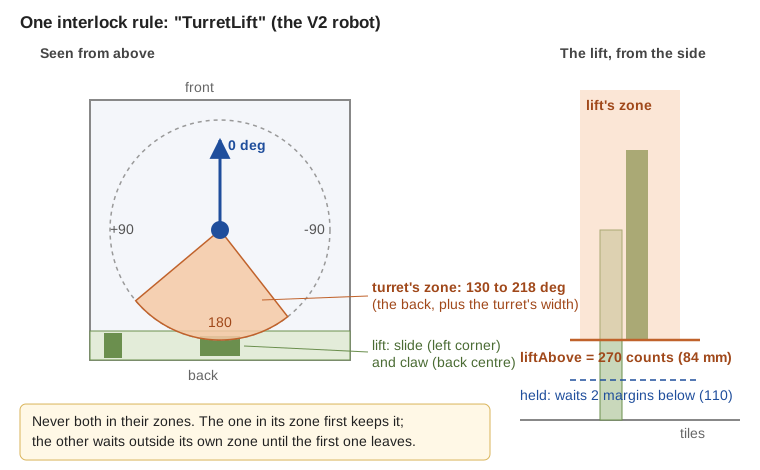
Each part gets a zone: the space it must stay out of while the other part is in its own zone.
- The turret’s zone: from 109 to 239 degrees (straight back is 180; counterclockwise is +). Say the lifter’s parts are at 142 to 206, and the turret’s own parts reach 33 degrees to each side of where it points: 33 degrees more on each side gives 109 to 239.
- The lift’s zone: above 270 encoder counts (84 mm: where the slide starts to be in the turret’s way).
// Robot.java, after the parts:keepApart("TurretLift", turret.zone(), lift.zoneAbove());// Tunables.java: the numbers, in each part's own unitspublic static class TurretLift { public static double turretFrom = 109, turretTo = 239; // degrees public static double liftAbove = 270; // counts public static double liftStopSec = 0.2; // optional: see "Stop distance"}The section name is the rule’s name. The field names start with the part’s Tunables name with a small
first letter: Turret gives turretFrom and turretTo, Lift gives liftAbove.
Who waits?
Section titled “Who waits?”The rule is simple: whoever is in its zone first keeps it. The other part waits outside its own zone.
flowchart TD
    A{"Is one part in its zone?"} -->|"the turret is"| B["The lift waits below its line.<br/>Its target is kept: it goes on<br/>when the turret leaves."]
    A -->|"the lift is"| C["The turret waits at the edge of its zone<br/>(or goes the other way round,<br/>if its range allows)."]
    A -->|"neither"| D{"Does one want in?"}
    D -->|"yes"| E["That one goes in.<br/>(Both at once: one too fast to stop<br/>before its zone, else the first one<br/>named in the rule.)"]
    D -->|"no"| F["Nothing to do."]
    A -->|"both!"| G["Neither may go deeper.<br/>Each may only move OUT.<br/>The first one out lets the other keep its zone."]
What the drivers see on the Driver Station, one line per rule, only while something is held:
TurretLift : Lift held at 110 counts: Turret is between 109 and 239 degTurretLift : Turret held at 124 deg: Lift is above 270 countsTurretLift : both in their zones (...): move one out (each may only move out)How a waiting part waits. It stops two margins before its zone (the margin is a safety distance in the part’s units: by default 3 degrees for a turret, about 1/50 of a lift’s range, 0.02 for a servo). Its target is kept, so it goes on by itself the moment the other part leaves. A part counts as “in its zone” within one margin of it.
Stop distance: a fast part brakes in time
Section titled “Stop distance: a fast part brakes in time”A motor does not stop the moment it is told to. Two things carry it on:
- The loop. The robot only looks and decides once per loop. A loop is usually 10 to 30 ms, but a camera, a busy hub or a slow sensor can make some loops 100 ms or more. Until the next loop, the part keeps going at full speed. (And the position it reads is from the last loop, so count that loop too.)
- Braking. With its power cut (BRAKE), a motor still coasts a little while it slows down.
So every loop the rule measures each motor part’s speed (from its encoder) and works out its stop distance: how far it would still go if it were told to stop now.
stop distance = speed x (2 x the slowest of the last 25 loops + half of <part>StopSec)A part that must wait may only use the power that lets it stop in time: it slows down as it comes near
its waiting point, and brakes (power 0) as soon as its stop distance would take it past it. Its top speed
comes from its motor (Turret.motor(..., "gobilda-5203-312"), Arm.motor, Lift.slide(...).part(...)),
or from the fastest the rule has seen it move. Example: the v2bot’s turret turns about 680 degrees a
second; in the simulator, at full stick toward the back with the wrist folded, it slows down and stops at
its waiting point (-137), 6 degrees outside its zone, even with the computer so busy that loops get slow.
A part moving so fast that it could not stop before its zone counts as already in it: the other part waits, so the two never both start into their zones.
<part>StopSec (optional, default 0.15 s): how long the part takes to stop from full speed once its
power is cut. A heavy slide or a big turret may take longer: test it with the stick fully toward the zone;
if it ever ends past its waiting point, raise it. The margin is now extra safety on top (an encoder that
slips, a part that bends), not the room to coast. A servo needs no stop distance: it is never sent past
its fence, and until its travelSec is over it counts as anywhere between where it was and where it was
sent.
A part whose way crosses its zone. A lift at 0 asked to go to 1000 through a zone from 400 to 600 asks for the zone just like a target inside it: it goes when the other part is out (which is then held out), instead of waiting below the zone for ever.
A turret crossing its zone. A turret at 80 degrees asked to go to 250 degrees (the same direction as -110) would pass through the back (109 to 239) turning counterclockwise. If its range lets it reach -110 the other way round (a range like -190 to 190, or a slip ring), it turns clockwise instead and never waits. If not (a range of -90 to 90 cannot reach either), it stops at 103 (two margins of 3 before 109) and waits while the lift is up.
Both in their zones. This should never happen, but it can: at START, after the robot was pushed, or when a part was moved by hand. Then nobody keeps a zone: neither part may go deeper, each may only move out. As soon as one is out, the other keeps its zone.
A part whose position is not known. A turret that has not found its home switch yet could be pointing
anywhere; a servo cannot say where it is. Until they are known, they count as “maybe in the zone”, so the
other part waits. A servo counts as anywhere between where it was and where it was sent, until its
travelSec says it has arrived. A wrist that must be folded before the lift goes down is really folded
before the lift moves. The Driver Station says why the other part waits:
TurretLift : Lift held at 110 counts: Turret angle unknown (not homed yet)TurretLift : LiftLeft held at 268 counts: Turret angle unknown (not sent anywhere yet: it goes to its start angle at START)A servo turret is sent to its startAngle (or the middle of its range) at START, so this lasts only until
the first loop after START.
And the other way round: a part whose position is not known does not move at all (no homing, no stick, no first servo move) while the other part is in its zone: from “anywhere” it could sweep through it. A turret waits to home while the lift is up, and homes as soon as the lift is down (its homing time limit waits too). A first move that cannot go into the zone from anywhere (a wrist sent to “folded”, below a zone at the top of its range) does not wait.
TurretLift : Turret waits (not homed yet): Lift is above 620 counts; move Lift out of its zone firstAt START the rules look first, before any START command is sent (a hood going to its startAngle, a
turret homing, an atStart action): a START command into a zone the other part is in waits at the fence
like any other command.
More examples
Section titled “More examples”A wrist that must be folded before the lift goes low. The wrist sticks out past the slide; low down it would hit the robot’s frame.
keepApart("WristLift", wrist.zone(), lift.zoneBelow());
public static class WristLift {    public static double wristFrom = 0.45, wristTo = 1.0;   // servo positions: folded out    public static double liftBelow = 300;                   // counts: low}
An arm that must not come down while the intake is folded out.
keepApart("ArmIntake", arm.zoneBelow(), intakeDeploy.zone());
public static class ArmIntake {    public static double armBelow = 30;                         // degrees    public static double intakeDeployFrom = 0.5, intakeDeployTo = 1.0;}
A claw that must be closed above a height.
keepApart("ClawLift", claw.zone(), lift.zoneAbove());
public static class ClawLift {    public static double clawFrom = 0.0, clawTo = 0.6;     // anything short of closed (closed = 0.75)    public static double liftAbove = 1800;}
Something the library cannot move (your own sensor or device): a condition.
keepApart("ArmBucket", arm.zoneBelow(), Zone.when("the bucket is up", () -> bucketUp.isPressed()));Any number of rules, between any parts with a position: turret, lift, arm, claw, wrist, positioner, hood. A robot with no rules works exactly as before.
Checked at INIT
Section titled “Checked at INIT”The OpMode stops at INIT with the reason if a rule has no Tunables section, a number is missing, a zone is
empty (from not below to), outside the part’s range, or covers its whole range (the part could never be
out of it), a margin is negative, a StopSec is outside 0 to 2 seconds, or a part has no position (an intake roller: use Zone.when). The INIT
screen lists each rule:
Interlock TurretLift: Turret between 109 and 239 deg / Lift above 270 counts.
A rule with a part that is not on the robot yet (optional(),
its device not in the configuration) is off: there is nothing to hit, so it needs no Tunables section and
holds nothing back. INIT says Interlock TurretLift: off (Lift is not on the robot).
Why the numbers are not live
Section titled “Why the numbers are not live”The zones are read once at INIT and are not in the tuning menu. A zone that moved while the parts were
moving could suddenly put both in their zones. Change the numbers in Tunables.java, then INIT again.
What it does not do
Section titled “What it does not do”- It does not replace hard stops, and it does not see another robot pushing yours.
- It does not move a part out of the way by itself (no surprise moves): a waiting part waits, and the drivers move the other one.
- It only knows what you tell it: measure the zones on the real robot (move one part into the other slowly, by hand, and write down where they touch), then add the margins.
Try it
Section titled “Try it”The v2bot example has a
turret, a lift with a wrist and a claw, and a rule from team 8938’s measured designs:
keepApart("TurretClaw", turret.zone(), wrist.zone()). Its claw only reaches the turret while the wrist
is folded or at pick-up (0 to 47 degrees), at any lift height, so the rule is between the turret and
the wrist, not the lift: the turret stays out of 147 to 217 degrees while the wrist is low. The
reasons and the numbers are in its Tunables.TurretClaw. Run its TeleOp in the
simulator: with the wrist folded, turn the turret toward the back with the stick (it
stops at the edge), then score in a FLOWER (G2 Y): while the wrist is out, the turret is free to turn to
the back. When the action folds the wrist again at the end, the rule is back on: a turret at the back
then holds the wrist out (it waits until the turret turns away).
Something wrong on this page? Tell us with a short GitHub form.